A good website is one of the most crucial elements to grow your brand online. However, a website is only good when it shows up on the top pages of Google searches; otherwise, it’s just a pretty template sitting on the 6th page of Google results where no user is going to look. If you can relate to this problem, then you must have asked yourself, “Why is my website not showing up on Google?”
Here’s the thing, though: a website not showing up on Google rarely happens for some mysterious, complicated reason. It’s usually one of a handful of pretty ordinary issues, and once you know what to look for, most of them are quick to fix.
Top 10 Reasons Your Website Is Not Showing Up On Google
Many technical issues can cause your website to not show up on Google searches. While many people only ever look at the keywords and SEO, the actual problem can be technical or have to do something with Google’s web crawlers or indexing issues. Here are some of the top issues that can be the reason why your website is not visible on Google.
1. Nobody Ever Set Up Search Console
A lot of business owners skip this step entirely, and it’s a mistake. Google Search Console is free, and it’s basically the only place you can see your site the way Google sees it. Without it, you have no idea if there’s an indexing problem, a security flag, or something else quietly keeping you out of search results.
Get it set up, verify your domain, and take a look at the Coverage report. It’ll tell you flat out which pages are indexed and which ones aren’t, along with why.
2. Your Website is Too New
If you have just launched your website and you are worried about why your website hasn’t shown up on Google yet, then relax for a bit. Google has to find your website, crawl it, and then finally index it so it can show up on the Google pages. It may take a few days or a few weeks before it can finally show up on Google.
If your website has just launched, then you will have to wait it out for a couple of weeks before you can see it. While you are waiting, make sure you submit your sitemap through Google Search Console, which will help with indexing and finding your website.
3. Robots.txt Is Blocking Google Without You Knowing
This one happens more than people think, especially after a site redesign or a move from a staging server to the live site. Your robots.txt file is basically a set of instructions telling search engines what they can and can’t crawl. If it’s set up wrong, it can block Google from your entire website without any obvious warning sign on your end.
Pull up yourdomain.com/robots.txt and check it yourself, or have your developer take a look. If it says “Disallow: /”, you’ve found your problem.
4. There’s a Noindex Tag Sitting on Your Pages
A noindex tag does exactly what it sounds like. It tells Google, “don’t put this page in search results.” Sometimes this gets added during development and just never gets removed before launch. It’s a small line of code that can quietly tank your visibility.
If you’re not sure how to check this yourself, ask whoever manages your site to look at the page’s HTML for a meta robots tag. It’s a five-minute fix once you find it.
5. Your Site Structure Doesn’t Make Any Sense
The crawlers should be able to easily navigate through your website as soon as they land on your homepage. If Google can’t easily navigate to the crucial pages of your website, then this may affect your Google ranking. Confusing navigation, orphaned pages, and broken internal links all get in the way of your website appearing on Google.
The simple fix is: the important pages should be a click or two away from your homepage and not buried five layers deep.
6. Your Content Has Nothing to Offer
Google’s whole job is to show people the most useful answer to what they typed in. If your pages are thin, copied from somewhere else, or don’t really say anything, Google has little reason to rank them or index them at all.
This is one of the more overlooked reasons. Writing real, useful content that actually answers what your customers are asking tends to matter more than most of the technical stuff people obsess over.
7. No One Is Linking to You
Backlinks work kind of like word of mouth for search engines. When other sites link to yours, it boosts the credibility your content makes Google believe it is worth trusting. Without them, even a well-built site can struggle to rank, which is a big reason behind a website not ranking on Google even after it’s technically live and indexed.
Getting listed in local directories, showing up on Google Business Profile, and building a few genuine partnerships with other local sites all help here.
8. The Site Is Slow, Especially on Mobile
Page speed and mobile usability aren’t just nice to have anymore; they’re ranking factors. If your site takes forever to load or looks broken on a phone, that’s working against you twice over: users bounce, and Google notices.
Run your site through Google PageSpeed Insights and see what comes up. Usually it’s something fixable, like oversized images or bloated code.
9. You’re Unaware of a Penalty or Security Flag
There are times when a site that’s not showing up in Google is because of something more serious, such as a manual action from Google or a security issue such as malware or a hack. It’s not as common a problem, but it does happen, especially with older sites that aren’t maintained.
Check the Security Issues and Manual Actions sections inside Search Console. If either shows something, that has to be resolved before your rankings can recover.
10. The Basics of Technical SEO Were Never Handled
Sometimes it really is this simple. Missing title tags, no meta descriptions, duplicate content across multiple pages, or canonical tags pointing to the wrong place can all confuse Google about which page it should actually show. And when Google’s confused, it often just doesn’t show anything.
A full audit of your titles, meta descriptions, and header tags across the site usually turns up a few easy wins.
So How Long Does This Actually Take to Fix?
For a new website with no other issues, indexing usually happens within a few days to a couple of weeks. If you’re dealing with an existing site that has something broken, fixing the actual cause often gets your pages reindexed fairly quickly, sometimes within days. Full ranking recovery, though, can take longer depending on how serious the issue was.
My Site Is Indexed But Still Not Ranking. Why?
Good question, and it trips people up a lot. Being indexed just means Google knows your page exists. Ranking well is a completely different thing that depends on your content quality, your backlinks, and how competitive your industry is. A site can be sitting in Google’s index and still be buried on page 9 if it’s not competing well against everyone else targeting the same search terms.
The Bottom Line
Most cases of a website not showing up on Google trace back to something fixable, whether that’s a brand new site that just needs time, a stray noindex tag, or a robots.txt file blocking more than it should. It’s rarely as complicated as it feels when you’re staring at zero search results for your own business.
If you’ve gone through this list and you’re still stuck, that’s usually a sign it’s worth having someone take a closer look. At SoloITech, we work with businesses around Minneapolis to track down exactly what’s keeping their site invisible and get it fixed properly, not just patched.
FAQs
Why is my website not visible on Google at all?
Usually it’s because the site is brand new, blocked by robots.txt, tagged with noindex, or was never submitted through Search Console in the first place.
How can I check if Google has actually indexed my site?
Type “site:yourdomain.com” straight into Google. If pages come up, you’re indexed. If nothing shows, there’s likely an indexing issue to sort out.
Does site speed really affect whether I show up on Google?
Yes, it does. Speed is a known ranking factor, and a slow site can hurt both your visibility and where you land in results.
Do I absolutely need backlinks to show up on Google?
Not for basic indexing, no. But backlinks matter a lot when it comes to ranking well once your site is indexed.
My site was fine and then just disappeared from Google. What happened?
This often points to a manual penalty, a hacked site, or a technical change that accidentally added a noindex tag or blocked crawling. Search Console is the first place to check.
Is this something I can fix myself, or do I need help?
Some of these issues are simple enough to fix on your own, like submitting a sitemap. Others, like technical SEO audits or recovering from a penalty, usually go faster with an experienced team involved.
Also read: Google Ads Agency in Minneapolis: A Complete Guide for Local Businesses
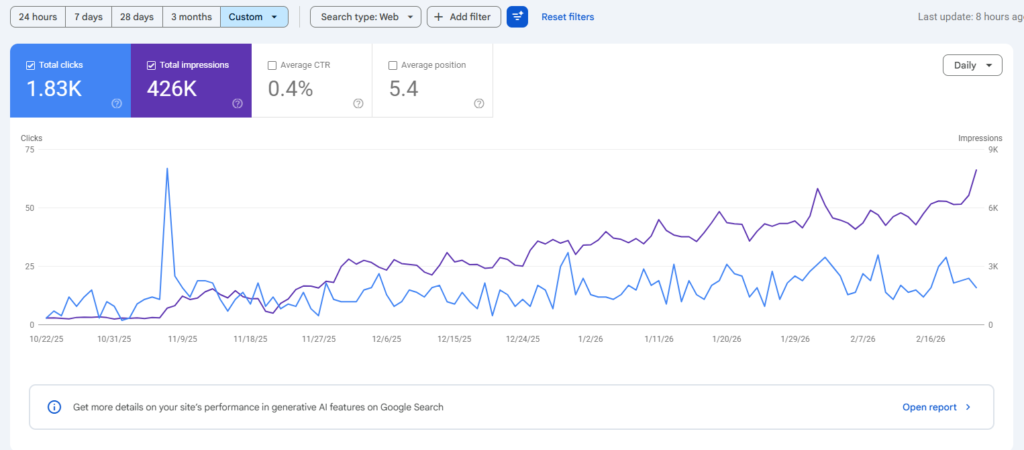
See Our SEO Results in Action